Hairstyle Try On: AI Haircut
SuLanBeauty
4.23.00 Reviews
- Version
- 1.6.7.4
- Installs
- 10.00K
- Age Rating
- Everyone
Screenshots
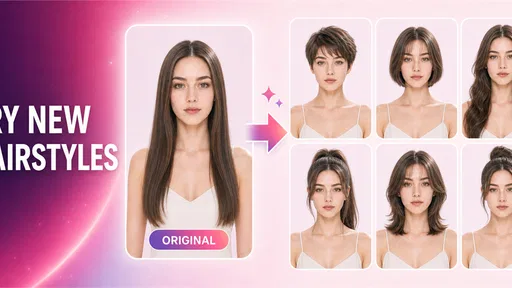
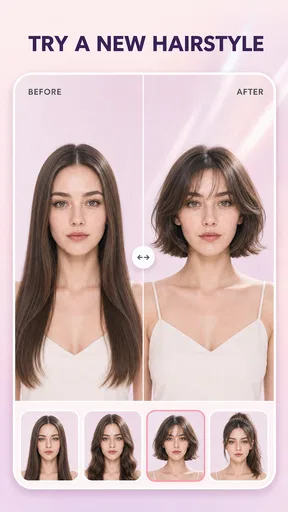
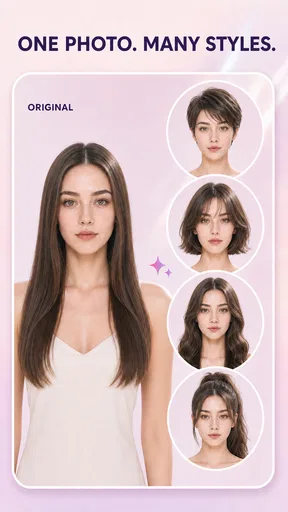
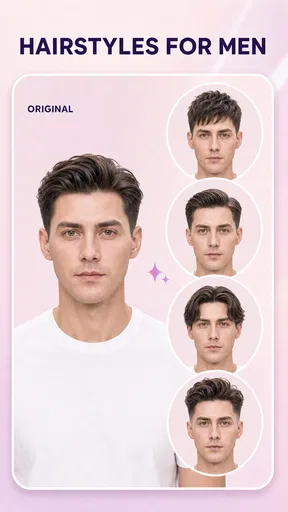
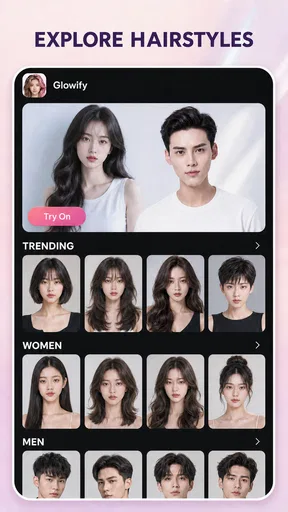
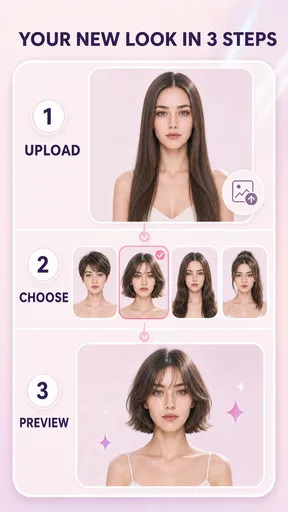
Our Review of Hairstyle Try On: AI Haircut
 Analysis by Appyee
I opened Hairstyle Try On: AI Haircut expecting a quick bit of entertainment, but it became more useful once I treated it as a planning tool rather than a virtual makeover toy. This free beauty app from SuLan lets me place different hair ideas over a photo, including cuts, fringe, braids, curls, wedding looks and colour changes. The first impression is immediate: one picture can become a small collection of possible styles without booking an appointment or trying to explain a reference image.
That instant visual feedback is the app’s strongest first-week appeal. A haircut can sound attractive when described in words and look completely wrong when adapted to a particular face, hairline or overall style. Seeing an approximation on my own photo makes the decision more concrete. It is not the same as seeing a professional stylist’s finished work, but it gives me a practical starting point for a conversation.
The app is aimed at anyone who wants to experiment before making a change. It can be useful for someone considering a fringe, a shorter shape, curls, a new colour or a formal style for an event. It is also approachable for casual users because it does not require specialist beauty knowledge. The content rating is Everyone, and the app runs on Android devices using version 8.0 or later, which makes it accessible to many older phones as well as newer models.
What remains useful after the novelty wears off
I find this app most worthwhile when I return to a specific choice rather than browse for its own sake. Before opening it, I can decide what I need to compare—such as two fringe shapes or a familiar cut in a different colour—and keep the session focused. That small habit helps turn a quick visual experiment into a reference I can actually use, while also making it easier to notice where the preview still leaves questions.
The first session is fun, but the real test is decision-making
During the first session, the temptation is to try everything. I found myself moving quickly between dramatic cuts and colours simply because the visual change is entertaining. That is fine for exploring, but the app becomes more valuable when I narrow the process to a real decision. Instead of asking, “Which style looks most exciting?”, I would ask, “Which option could I realistically maintain and explain to a stylist?”
A useful workflow is to begin with a clear, front-facing photo in ordinary lighting. I would avoid a picture with a strong filter, heavy shadow or hair covering most of the face. The goal is not to create a perfect portrait; it is to give the app a sensible base from which to show the proposed look. Comparing several options from the same photo also makes the results easier to judge because the face, expression and framing stay consistent.
One of the less obvious benefits is that the app can help separate a desire for a new shape from a desire for a new colour. If I change both at the same time, it becomes difficult to know what I actually like. Testing a fringe with a familiar colour first, then trying the same general cut with a different shade, gives a more useful comparison. This simple two-stage approach prevents the most dramatic preview from automatically winning.
I would also use it before a consultation, not instead of one. A saved or shown preview can help communicate the direction I have in mind, especially when I do not know the correct names for layers, fringe shapes or curl patterns. A stylist still needs to judge texture, density, growth patterns and the condition of the hair. The app helps with the conversation, while the professional decides what can be achieved safely and attractively.
Everyday scenarios where it earns its place
Imagine someone preparing for a wedding and choosing between a braided style, a curled look and a more formal arrangement. Rather than relying only on photographs of models, that person can use their own face as the reference point. The preview may not reproduce the final styling exactly, but it can reveal which general direction feels comfortable. That matters when an event will involve photographs and long hours of wear.
Another realistic situation is a person who has kept the same haircut for years and wants a change but feels nervous about going too far. I would start with a modest variation, then compare it with a shorter or more noticeable option. This creates a visual ladder from familiar to adventurous. Even if none of the previews is perfect, the exercise can clarify whether the user wants more movement, a different front shape or simply a refreshed colour.
Parents and friends may also use the app for lighthearted style discussions, but I would be careful about treating the images as promises. A preview is best used to collect ideas and rule out directions that clearly do not appeal. It should not become a reason to pressure someone into changing their appearance.
How it compares with familiar alternatives
The usual alternative is searching image boards, social feeds or salon galleries. Those sources are better for seeing real hair texture, professional finishing and how a style looks from several angles. Their weakness is that the model’s face, complexion and hair characteristics are different from the viewer’s. This app reverses that advantage: it puts the idea on the user’s own photo, even if the result is less realistic than a professional image.
Another alternative is asking a stylist directly. That remains the better choice for technical advice, especially when the decision involves a major cut, chemical colour or a style that depends heavily on natural texture. The app is faster and more private for early exploration, while the stylist is more reliable for feasibility and maintenance. I see it as a bridge between browsing and booking rather than a replacement for either.
Compared with manually editing a photo in a general image editor, the beauty-focused approach is more convenient. I do not need to build the hairstyle layer by layer or spend time searching for suitable visual elements. The trade-off is control: a general editor may offer more precise adjustments, while this app is designed around quick experimentation. For most people considering a haircut, that speed is probably more valuable than detailed editing control.
The maintenance question is where the app needs help from the user
The previews show appearance, not the work required to keep that appearance. This is the most important limitation for long-term usefulness. A fringe may look appealing in a still image but require frequent shaping. Curls may need a different washing and styling routine. A colour change may involve upkeep that is not obvious from the preview. Braids and wedding styles may be excellent for a particular occasion without being practical for everyday life.
I would therefore add a second question to every comparison: “Would I still choose this if I had to style it on a busy morning?” That question is more revealing than simply choosing the most flattering image. A look that depends on professional styling may be appropriate for an event but unsuitable as a regular haircut. Conversely, a simpler cut may have less visual drama but offer much better recurring value.
The app can support this thinking by encouraging comparisons between high-maintenance and low-maintenance directions. For example, I might compare a polished curled style with a simpler shape that works closer to my usual routine. I would then show both to a stylist and ask what daily effort, products or appointments each would realistically require. This turns a visual experiment into a more responsible decision.
There is also a technical maintenance burden inside the app itself. The novelty encourages repeated testing, but the process can become tiring if I keep generating variations without a clear purpose. I get more value when I set a small goal before opening it: choose a fringe direction, compare two lengths, or find a colour family for a consultation. Without that limit, the app can become an endless stream of attractive but disconnected possibilities.
Where fatigue can set in
Visual try-on tools are naturally vulnerable to repetition. After the initial excitement, many users may discover that they return only when a haircut decision is approaching. That is not necessarily a failure. A beauty app does not need to be opened every day to be useful. Its lasting value depends on whether it helps with meaningful decisions rather than whether it creates a daily habit.
Fatigue is more likely when the user expects photographic accuracy. A preview can suggest a silhouette or mood, but hair is three-dimensional and changes with movement, lighting and texture. A style that looks balanced in one image may not translate perfectly in person. I would avoid making a permanent decision based on a single preview, especially for a dramatic cut or colour. Checking several photos, or using the result only as a discussion reference, is safer.
There is also a risk of choice overload. The range of cuts, fringe ideas, braids, curls, wedding styles and colours is appealing at first, but too many options can make a simple decision harder. My advice is to create a shortlist of three directions: one conservative, one moderate and one bold. That keeps the session focused and makes it easier to identify what is genuinely attractive rather than what is merely surprising.
The free entry point is helpful, but users should pay attention to the commercial model before committing to extended experimentation. The app is free to download and use at its basic entry point, while in-app purchases range from around five dollars to nearly thirty-nine dollars per item. I would not spend money simply because a dramatic preview looks impressive. I would first decide whether the tool has helped me make a real choice and whether any paid item adds enough value for that specific purpose.
Who should use it, and who should skip it?
I think it is a good fit for someone who wants a quick visual aid before visiting a salon, someone nervous about changing their look, or someone choosing between several event hairstyles. It is also suitable for casual experimentation when the user understands that the images are references rather than guarantees. The free price makes it easy to test without treating the first session as a major commitment.
I would be more cautious recommending it to a person who needs exact technical guidance. If the decision depends on how a style will behave with a particular curl pattern, damaged hair, thinning areas or a specific treatment history, a stylist’s assessment is more valuable. The same applies to anyone looking for a full hair-care routine rather than visual inspiration. This app focuses on appearance choices, not a complete consultation.
It may also be the wrong tool for someone who dislikes photo-based experimentation or becomes anxious when comparing altered versions of their appearance. In that case, a conversation with a trusted stylist and a folder of real reference photos may feel more grounded. The app is most helpful when it reduces uncertainty, not when it creates pressure to pursue an unfamiliar image.
My long-term verdict
After the novelty fades, I do not see this as a daily beauty habit, and I do not think it needs to be one. Its recurring value comes from occasional moments: before a haircut, ahead of a wedding, when considering a colour change, or when a familiar style has started to feel stale. Used with a specific question in mind, it can save time and make a salon conversation clearer.
The strongest long-term habit is not opening the app constantly; it is using a disciplined comparison process. Start with a sensible photo, change one major element at a time, keep a short list, and ask what each look would require in real life. That approach protects the user from choosing a style only because it looks striking in a preview. It also makes the app more useful month after month, because each session has a practical purpose.
SuLan’s app has a 4.6 average from around 165 ratings and has passed 10 thousand installs, which suggests that it has found an audience among people curious about visual hairstyle changes. Its current version is 1.6.7.0, and the Everyone rating keeps the audience broad. Those details do not change the main judgement: the app is best understood as a fast idea generator with some decision-making value, not as a substitute for professional hair advice.
My recommendation is to try it when you have a real hairstyle question, not merely an urge to scroll through transformations. If you want quick previews of cuts, fringe, braids, curls, wedding looks and colours on your own photo, it offers a convenient starting point. If you need precise realism, detailed maintenance advice or confidence about technical results, pair it with real reference images and a qualified stylist. That balance is what allows Hairstyle Try On: AI Haircut to remain useful after its first-week novelty has worn off.
Verdict
Strengths of Hairstyle Try On: AI Haircut
- Lets you preview many haircuts before visiting a salon.
- AI results are generated quickly for convenient experimentation.
- Useful for comparing short, medium, and long hairstyle ideas.
- Can help communicate a preferred look to your hairstylist.
- Provides inspiration when you want to change your appearance.
Limitations of Hairstyle Try On: AI Haircut
- Some hairstyles may look unrealistic on certain face shapes.
- Results can vary depending on lighting and photo quality.
- Advanced styles or features may require a subscription.
- The app may collect photos or personal data for processing.
- AI previews cannot accurately show real hair texture or movement.
Similar Picks in This Category
View All
Beauty Makeup Editor & Camera
Photo & Video Editors - Instant Solution4.7

Perfect365: Face Makeup Editor
Perfect365, Inc.3.5

Mirror Plus - HD Mirror app
Digitalchemy, LLC4.8

Cute Lock Screen & Wallpapers
Prometheus Interactive LLC4.6

HD Camera for Android
One Music Player4.5

Phone Mirror app - True Mirror
Cards4.6
Frequently Asked Questions
What is Hairstyle Try On: AI Haircut, and how does it work?
Hairstyle Try On: AI Haircut is a virtual hairstyle app that uses artificial intelligence to preview different haircuts and looks on your photo. After selecting or taking a picture, you can explore styles such as short cuts, long hair, bangs, layers, and other modern options. The result is intended as a visual guide rather than a guaranteed salon-accurate transformation.
Does Hairstyle Try On: AI Haircut require a photo to generate hairstyles?
Yes, the app generally works best when you upload a clear front-facing portrait or take a new selfie. Good lighting, a neutral expression, and hair that does not cover too much of your face can improve the preview. Depending on the available features, some styles may also be demonstrated through templates or artificial models, but personal results usually require an image.
Is Hairstyle Try On: AI Haircut free to download and use?
The application can typically be downloaded at no initial cost, but some hairstyles, AI generations, editing tools, or export options may be restricted behind in-app purchases or a subscription. Pricing and trial conditions can vary by platform and region. Before confirming payment, carefully review the subscription screen, renewal terms, and whether a free trial converts automatically.
Can the hairstyles created in the app be used as a realistic reference for a hairdresser?
The generated images can be useful for communicating a general idea, especially when comparing lengths, fringe styles, colors, or overall shapes. However, AI previews may not accurately represent your natural texture, thickness, face shape, or how a cut will behave in real life. It is best to show the image to a professional stylist and discuss practical adjustments before making a change.
How does Hairstyle Try On: AI Haircut handle photos and personal data?
Before uploading personal photos, check the app’s privacy policy and the permissions requested on your device. Some features may process images online, while others may store generated results or account information for a period of time. Avoid uploading photos containing other people without permission, and remove saved images or revoke access through your Android or iOS privacy settings when you no longer need the service.
